A cache is a small fast SRAM that sits between the CPU and main memory and holds copies of the blocks the CPU has touched recently. Every load and store goes through it: if the requested address is in the cache it’s a hit and the data comes back in a cycle or two; otherwise it’s a miss, the access falls through to the next level, and the fetched block is dropped into the cache on the way back so the next access to a nearby address is fast.
The reason this works at all is locality. Programs reuse the same data and code over short windows (temporal locality), and when they touch one address they almost always touch its neighbours soon after (spatial locality). A cache big enough to hold the working set plus one block long enough to cover a few neighbours catches the bulk of accesses.
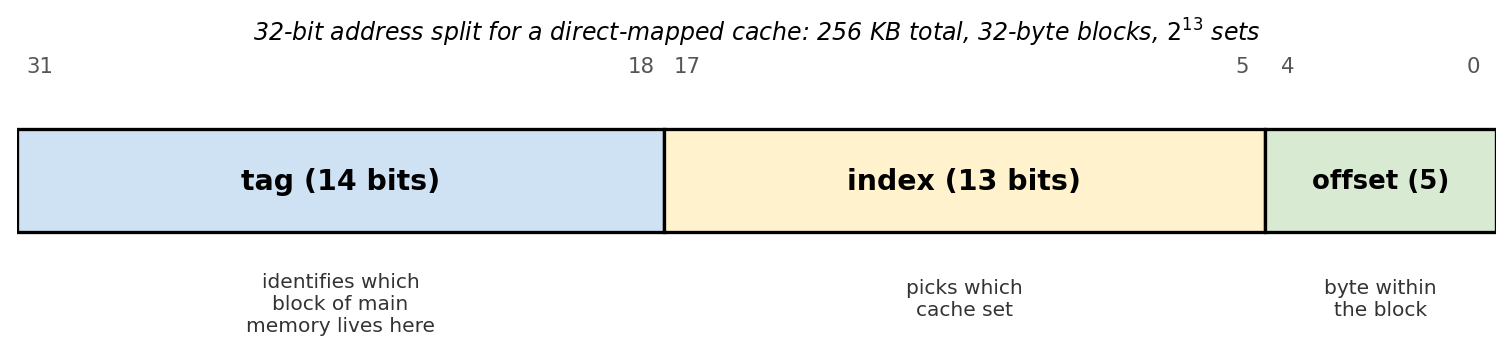 How a 32-bit address splits into tag, index, and offset for a direct-mapped 256 KB cache with 32-byte blocks. See Cache address mapping for the bit-math and worked example.
Levels
A modern processor doesn’t have a cache, it has three:
- L1, split into a separate instruction cache (I-cache) and data cache (D-cache). The split is what lets the front-end fetch an instruction and the load/store unit fetch data on the same cycle. Sizes are tiny (32 KB each is typical, sometimes 48–64 KB on bigger cores) and access is 4–5 cycles, a few hundred picoseconds at 3 GHz.
- L2, unified, per-core, 256 KB – 1 MB, about 12–20 cycles.
- L3 (sometimes called LLC, last-level cache), unified, shared across all cores on the die, anywhere from 4 MB on a small chip to 64 MB+ on a server part. About 30–50 cycles.
Past L3 is DRAM at ~200–300 cycles. Each level is roughly an order of magnitude bigger and an order of magnitude slower than the one above it; that’s not an accident, it’s what makes the average-access-time math work out.
The whole thing is invisible to the ISA. There’s no load instruction that says “from L1” or “from DRAM”: every load is the same opcode, and the hardware decides on the fly which level it gets satisfied from. The only observable effect is how long the load takes.
Block, tag, valid, dirty
The unit the cache moves around isn’t a byte or a word, it’s a block (also called a line), usually 64 bytes on x86 and ARM. A 32 KB L1 with 64-byte lines is 512 lines.
Each line stores:
- Tag: the high-order address bits identifying which block of main memory currently lives here.
- Valid bit: set when the line holds a fetched block, clear at reset and after invalidations.
- Dirty bit (write-back caches only): set the first time the line is written, telling the controller it has to be written back to memory before being evicted.
- Data: the 64-byte payload.
The bit math for how an address splits into tag / index / block-offset is in Cache address mapping.
Hits, misses, and the average
On a load, the hardware tries each level in turn until something hits:
- Check L1. If it hits, done in a few cycles.
- If L1 misses, check L2. If hit, the line is also filled into L1 on the way back.
- If L2 misses, check L3, fill into L2 and L1.
- If L3 misses, go to DRAM (and on a server chip, possibly to a remote socket first). Fill into L3, L2, L1.
So “L1 miss” is not “go to RAM”; it costs an L2 lookup, which is fast. Only an L3 miss (or “LLC miss” in generic talk) actually crosses the memory bus. People talk about the miss rate at each level: an L1 miss rate of 2–5% is typical for well-behaved code, of which only a small fraction also miss L2 and L3.
Average memory access time chains the levels:
where is the hit time and is the miss rate at that level. Plug in 4 cycles for L1, 15 for L2, 40 for L3, 300 for DRAM, miss rates of 0.05 / 0.20 / 0.40, and AMAT comes out around 7 cycles, close to L1 hit time, which is the whole point.
Why misses happen — the 3 Cs
Mark Hill’s PhD-era taxonomy splits every miss into one of three categories:
- Compulsory (or cold): the first time a block is ever referenced. Even an infinitely large cache pays this once per block. The only way to avoid it is prefetching, or making blocks larger so one miss covers more bytes.
- Capacity: the block was in the cache and got evicted because the program’s working set is bigger than the cache. Mitigation is “make the cache bigger” or “make the working set smaller” (loop tiling, blocking).
- Conflict: the block was in the cache and got evicted even though space was available elsewhere, because two hot addresses happened to map to the same set and there weren’t enough ways to keep both. Conflict misses are the reason a 4 KB array allocated at a bad alignment can run measurably slower than the same array shifted by one line. The fix is more associativity, or relocating data so its index bits don’t collide.
The taxonomy was useful enough that people invented a fourth C for multi-core, coherence misses: a block was kicked out (or downgraded) because another core wrote to it. These are the runtime cost of MESI and its relatives.
A back-of-envelope estimate for an I-cache: sequential code fetches block-aligned, so it takes one compulsory miss per instructions and then runs out of the cache. Miss rate , for words, around 6%. Real code is worse because of branches and data accesses, and better because of prefetching.
Replacement and write policies
When you fill a new block into a full set, something gets evicted. The textbook choices:
- LRU: evict the least-recently-used way. Optimal for many access patterns, but tracking exact recency for -way sets costs bits per set, so real chips use pseudo-LRU: tree-based approximations that get most of the benefit at a fraction of the area.
- Random: pick a way at random. Almost free, and within a couple of percent of pseudo-LRU on most workloads, which is why some Arm cores use it.
- FIFO: evict the oldest fill. Easy to implement, mediocre performance.
On writes, the two big knobs are:
- Write-through vs write-back: write-through pushes every write to the next level immediately, which is dead simple but burns memory bandwidth. Write-back lets the write live in the cache (marking the line dirty) and only flushes it when the line is evicted. All modern L1/L2/L3 caches are write-back.
- Write-allocate vs no-write-allocate: on a write miss, do you fetch the block into the cache (write-allocate, the usual choice with write-back) or do you bypass it and go straight to memory (no-write-allocate, sometimes paired with write-through)?
Write-back is what creates the cache coherence problem: when each core has its own L1 and L2, a dirty line in one core’s cache holds the only up-to-date copy of that address. The system needs a protocol so the other cores see the new value when they need it. The MESI protocol is the standard four-state machine, with MOESI/MESIF variants.
Why the whole CPU is bent around caches
A 3 GHz core wants an instruction every 0.33 ns. DRAM is 100 ns away. If every load went to memory, the core would sit idle 99% of the time, and that’s before talking about the fact that out-of-order execution can have a hundred instructions in flight, all stalled together on one miss.
So the entire microarchitecture is designed assuming L1 dominates. Branch prediction, out-of-order issue, the load-store queue, prefetchers: every one of them exists either to prevent a miss from happening or to hide one when it does. The performance cliff from a cold-cache pass over a 1 GB array vs. a hot-cache pass over a 4 KB array is the single biggest order-of-magnitude effect in everyday CPU performance. That’s why locality-aware data layout (struct-of-arrays, tiling, packing hot fields together) keeps mattering even at the application level.